How it works
How the benchmark works
The same test for every model: what the scores mean, quick or full, with and without GlirOS, and cloud tokens.
The benchmark (Settings > Benchmark, in the desktop app from GlirOS 0.1.4) runs the same test on any model: one on your PC, or a cloud model you have switched on. It shows what a model can do inside GlirOS on your computer, so you can choose the right one. See also Benchmark in the guide.
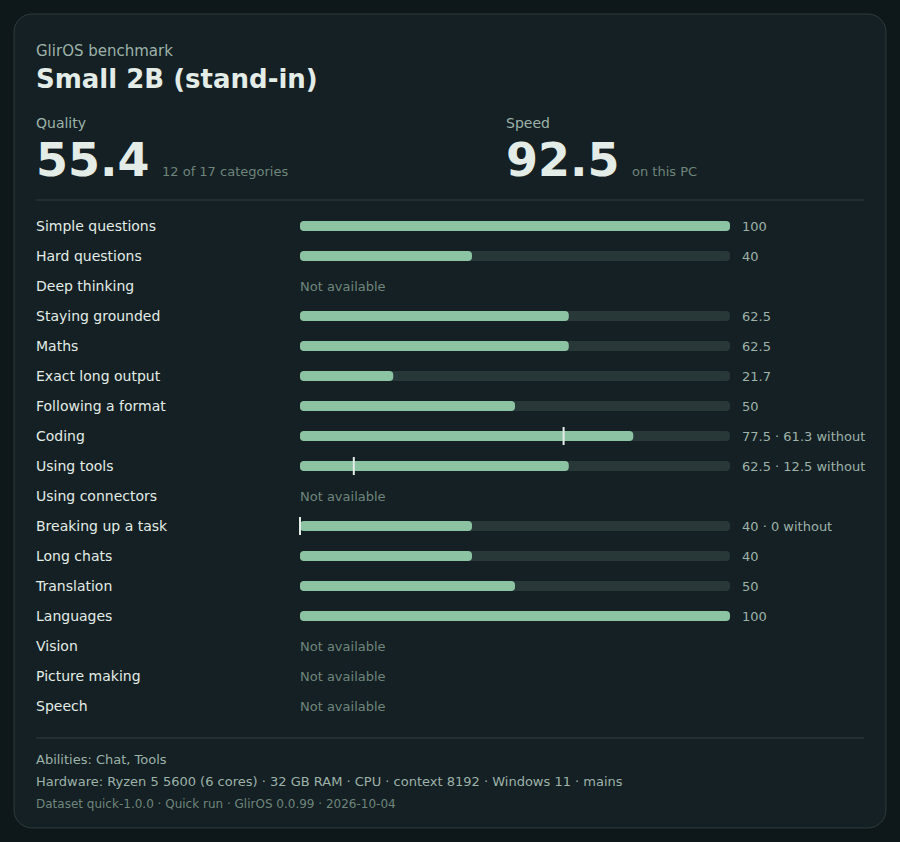
What the scores mean
- Quality (0–100): how many of the test's answers were right, weighted so that harder work counts more. The card says how many categories it covers ("12 of 17 categories").
- Speed (0–100): how fast the model is on this PC: words a second, the time to the first word, and the speed with a long conversation. The same model can score differently on another computer.
- One line per category: simple and hard questions, deep thinking, staying with the given text, maths, exact long output, following a format, coding, using tools, breaking up a task, long chats, translation and languages.
- "Not available" means the model can't do it at all (deep thinking without a thinking mode, for example). It doesn't pull Quality down.
- Show for: pick what matters to you (Balanced, Works with GlirOS, Coding, Languages and translation, Everyday assistant), and Quality is weighted for it.
Answers are checked by code, not by another AI model: maths must give the right number, code is run against tests in a sandbox, a tool call must name the right tool and arguments.
With and without GlirOS
Coding, using tools and breaking up a task are run twice. With GlirOS uses GlirOS's own help: its tool rules and the rescue of loosely written tool calls, the code checker's safe fixes and one fix turn, and the guided plans. Without takes the answer as it is. The difference shows what GlirOS's help changes for that model on your PC. It can be small, it differs from model to model, and on some items the plain answer does better: the test shows it rather than assuming it.
Quick or full
- Quick: about 42 items, each asked once. A few minutes on a graphics card; about 10–15 minutes for a small model on the processor.
- Full: all categories. Under an hour on a graphics card, and one to two hours on a small PC's processor, where GlirOS shows the estimate and suggests the quick run.
A model on your PC answers the same every time with the test's fixed settings, so each item is asked once, with a few asked again as a check. You can also choose the model maker's own settings at the start; then each item is asked three times. Cloud models vary a little, so a full run asks them each item three times and shows the spread.
Cloud models and tokens
A cloud model asks first. It names the company, says that the company sees the test questions and bills the tokens, and shows the estimated tokens: what to expect, the most it could be, and the number of requests. Thinking is billed extra by some models.

Afterwards the result shows the tokens the provider actually counted, beside the estimate. If a model uses far more than estimated, the run pauses and asks before it goes on. GlirOS shows no prices, because they differ between providers and change often: check your provider's price list before a full run.
What it never touches
- The test texts are written for GlirOS and hold nothing of yours. Nothing from your chats, files or settings is put in a question.
- The tools answer from fixed test data, so the tool categories are the same for everyone, and nothing happens to your own tools.
- Nothing goes into your chats, memory or activity log. While a test runs, chatting waits, and your own model is put back when it ends.
- There is no public results table, and nothing is uploaded. Export a result (a picture, a file, a text or a table) to share it yourself, or import one from another PC to compare.
A guide, not a lab result
A test this size is a guide. Differences under about 3 points mean nothing, and in a quick run one item is worth many points in its category. Speed also depends on what else the PC is doing: the result notes when the PC was on battery.