How it works
Make an animation
Short animated videos made on your own device: titles, name bars, countdowns, charts and more.
Animation makes short animated videos on your own device: title cards, name bars, moving text, countdowns, charts that grow, quotes that type themselves, slideshows of your own pictures, and logos. It doesn't make real-life video. Each video is an MP4 file in the chat: play it in the side panel, download it, or use it in Media Studio.
From the chat
Get Animation from the tool catalogue (Settings > Tools > Get more tools), from GlirOS 0.1.5, in the desktop app or the web version. Then just ask: "Make an intro for my video: Welcome to Oslo", or "a 10-second countdown with a tick each second". GlirOS picks the template and the words and opens Animation in the side panel with a preview. Press Make video. Ask for changes the same way: "make the title bigger", "use the sunset colours".
Your own pictures: a picture in the chat, such as a logo, can be animated too. Ask "show the logo, spin it, then slide it out to the right", or choose Open in Animation on the picture. The moves have names: spin, turn (like a coin), pulse, bounce, float, wobble and swing, and in or out from the left, right, top or bottom, or with a twirl. Animation doesn't need its panel open for this: GlirOS can make the video in the background, also in a scheduled task or as a step in a plan.
In the panel
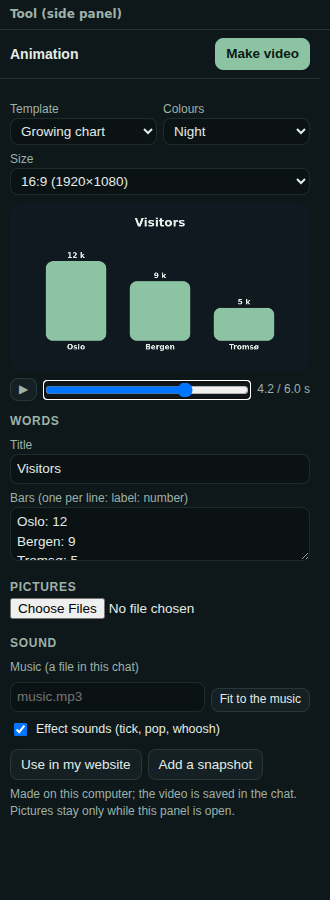
- Template: Title card, Name bar (lower third), Moving text, Countdown, Growing chart, Quote, Slideshow, Logo, Intro with lightning, or Moving background.
- Colours: GlirOS dark, Night, Paper, Ocean, Sunset, or Black and white.
- Size: wide (1920×1080 or 1280×720), square (1080×1080) or phone (1080×1920).
- A preview with play and a slider, so you can look at any moment.
- Words: the title, a name and a role, the lines of moving text, or a chart's bars, one per line ("Oslo: 12").
- Pictures: for a slideshow or a logo, from your PC or from the chat.
- Sound: music from a file in the chat, Fit to the music, and the Effect sounds switch.
- Make video shows the progress, with Cancel.
Intros and moving backgrounds
Intro with lightning makes a whole opening: a moving background with a lightning strike as the title pops in, your features popping in and out around the screen, then the logo, then black. Ask for it in your own words, for example "a 27-second intro for GlirOS in the dark theme, with lightning, the features popping in and out, and the logo fading away". If you haven't said which features to show, GlirOS asks first.
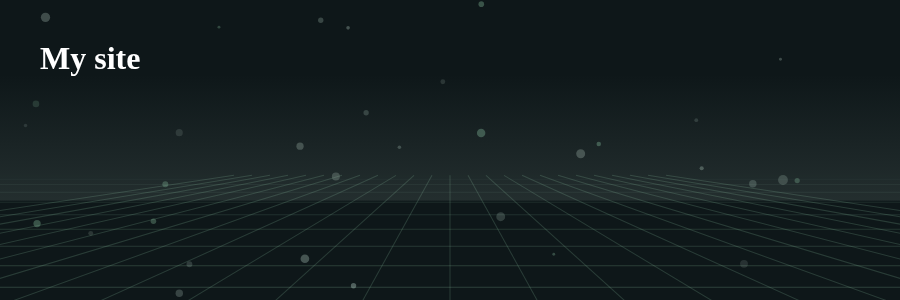
Moving background makes a calm background that loops: northern lights, sparks, a grid or waves, with lightning if you like.
Use it in your website
Use in my website turns an animation into a moving background for a web page you make in GlirOS (the Code workspace or the Website builder). It writes one small file, animations/NAME.js, into the project, and the page needs two lines: <div data-animation="NAME"></div> and <script src="NAME.js"></script>. The animation then plays behind that part of the page: it loops, pauses when it is out of view, and shows a still picture to people who have asked their device for less motion. It is only decoration, so the page's real headings and text stay as they are, and nothing is loaded from the internet.
Effect sounds and music
Animation adds short sounds where something happens: a tick on each step of a countdown and a ding at 0, a pop when a title or logo appears, and a whoosh when a name bar, a line of text or a chart comes in. GlirOS makes these sounds itself, so there are no sound files. Switch Effect sounds off for none.
You can add one music file from the chat. Fit to the music makes the animation exactly as long as the music (up to 60 seconds), and every part is stretched to match, so it ends with the music.
Sizes and languages
The phone size is upright, for stories and short videos. The words can be in any language.
Where the video goes
The video is saved in the chat's files. Play it in the side panel, download it, or choose Open in Media Studio to put it on a timeline with your own clips (see Video and sound). If making it takes a while and you are in another chat, the bell tells you when it's done. The animation itself is kept in the chat too, so you can come back and change it.
The desktop app makes an MP4 with H.264 video and AAC sound. The web version makes H.264 where the browser has it (Edge, Chrome), else VP9, with Opus sound.
Limits
- Up to 60 seconds, and at most 1920×1080, or 1080×1920 for the phone size.
- The pictures you add are kept with the animation in the chat, so they are there next time.
- The video is made on your device and stays there. With a cloud model, your words and the pictures you add go to that company, as in any chat.